> ## Documentation Index
> Fetch the complete documentation index at: https://docs.treasuryprime.com/llms.txt
> Use this file to discover all available pages before exploring further.
# FedNow Send
> FedNow payments can be sent 24/7, 365 days a year. Funds sent through the FedNow Service settle instantly.
### This guide uses the following endpoints
* [`/account`](/reference/account)
* [`/fednow`](/reference/fednow)
* [`/fednow/routing_number`](/reference/get_fednow_routing_number)
* [`/webhook`](/reference/webhook)
### To create a FedNow Send payment
1. [Check destination FI's FedNow Receiving capability](#1-check-destination-fis-fednow-receiving-capability)
2. [Get the Account ID](#2-get-the-account-id)
3. [Create the FedNow payment](#3-create-the-fednow-payment)
4. [Get status updates](#4-get-status-updates)
## 1. Check destination FI's FedNow Receiving capability
Since FedNow is a relatively new payment rail, not all financial institutions (FIs) are set up to receive payments. To verify if a destination FI will accept FedNow payments, make a `GET /fednow/routing_number/` request with the destination FI's routing number. If both the `online` and `receive` fields return `true`, proceed to the next step. If either field returns `false`, you can either inform the end user that the FedNow payment cannot be completed because the destination FI doesn't accept FedNow payments, or reroute the payment through a fallback payment rail, such as ACH.
```bash theme={null}
curl -u $API_KEY_ID:$API_SECRET_KEY https://api.treasuryprime.com/fednow/routing_number/110000994
```
## 2. Get the Account ID
Obtain the account ID for sending a FedNow payment by making a `GET /account` request, which returns a list of all accounts.
```bash theme={null}
curl -u $API_KEY_ID:$API_SECRET_KEY https://api.treasuryprime.com/account
```
Identify the `id` of the account you wish to send funds from. Verify that the account is neither [locked](/docs/locking-an-account) nor [closed](/docs/closing-an-account) before proceeding.
```json theme={null}
{
"tags": null,
"account_type": "checking",
"bank_id": "bank_example",
"org_id": "org_fednow_example",
"nickname": null,
"updated_at": "2025-09-17T17:16:12Z",
"currency": null,
"routing_number": "026015024",
"account_number": "2279603727",
"id": "acct_11m2wpvk1afhmxd",
"created_at": "2025-05-21T23:02:11Z",
"userdata": null
},
{
"tags": null,
"account_type": "checking",
"bank_id": "bank_example",
"org_id": "org_fednow_example",
"nickname": null,
"updated_at": "2025-04-02T22:04:47Z",
"currency": null,
"routing_number": "026015024",
"account_number": "511100003797",
"id": "acct_11kyvd2a184kych",
"created_at": "2025-04-02T22:03:54Z",
"userdata": null
}
```
## 3. Create the FedNow payment
Create the FedNow payment by initiating a `POST /fednow` request. The `security_context` object requires two fields: `ip_address` (the originating requestor's IP address) and `user_agent` (the originator's browser or device). An optional [`originator_name`](#modifying-originator-name-on-fednow-payment) field allows you to modify the sender name for third-party sender scenarios.
```bash theme={null}
curl --request POST \
--url https://api.treasuryprime.com/fednow \
--user $API_KEY_ID:$API_SECRET_KEY \
--header 'Content-Type: application/json' \
--data '{
"account_id": "acct_11m2wpvk1afhmxd",
"amount": "250.00",
"external_name": "Adam Smith",
"external_routing_number": "110000994",
"external_account_number": "110022339940",
"memo": "Payment for economic advice",
"security_context": {
"device_id": "2f4a3f0005614323a61ac09918d29129",
"ip_address": "192.168.1.1",
"user_agent": "Mozilla/5.0"
}
}'
```
Upon submission, Treasury Prime creates a new FedNow object with `pending` status. Because FedNow is an instant payment service, you cannot cancel the transaction after creating.
```json theme={null}
{
"description": null,
"amount": "250.00",
"bank_id": "bank_example",
"related_fednow_ids": [],
"account_id": "acct_11krnje614s6p3j",
"security_context": {
"ip_address": "192.168.1.1",
"user_agent": "Mozilla/5.0",
"device_id": "2f4a3f0005614323a61ac09918d29129"
},
"fed_settlement_date": null,
"org_id": "org_example",
"payment_type": "debit",
"external_status": null,
"external_reject_reason": null,
"external_routing_number": "110000994",
"updated_at": "2025-09-22T19:59:59Z",
"currency": "USD",
"status": "pending",
"id": "fednow_11md3anz1fsags2",
"payment_id": null,
"external_name": "Adam Smith",
"error": null,
"external_account_number": "110022339940",
"originator_name": null,
"memo": "Payment for economic advice",
"created_at": "2025-09-22T19:59:59Z"
}
```
### `status` vs `external_status` clarification
The `status` field indicates the FedNow object's current state within Treasury Prime's system. In contrast, the `external_status` field shows how the payment is being processed at the external financial institution. For instance, a FedNow payment might have a `status` of `sent` (meaning Treasury Prime successfully transmitted it) while having an `external_status` of `rejected` (indicating the receiving financial institution declined to accept it). See [FedNow Send Scenarios and Corresponding Statuses](#fednow-send-scenarios-and-corresponding-statuses) for a list of the various FedNow scenarios and their associated `external_status` values, and [FedNow Status and External Status Mappings](#fedNow-status-and-external-status-mappings) for a visual representation of how these statuses relate to each other.
### Insufficient funds on account behavior
FedNow payments may occasionally fail due to insufficient funds in the sending account. When this happens, the FedNow object's status will change to `error`, and the `error` field will display an insufficient funds message noting that the account balance is lower than the requested amount (ex: `Not enough funds: 186.88 < 200.00`).
## 4. Get status updates
There are two ways to find out when the status of the FedNow payment has changed:
### Manually checking for status updates
To retrieve the latest status of a FedNow payment, make a `GET /fednow/{id}` request with the FedNow object's ID.
```bash theme={null}
curl -u $API_KEY_ID:$API_SECRET_KEY https://api.treasuryprime.com/fednow/fednow_11md3anz1fsags2
```
Notice that the `status` field has changed to `sent` and the `external_status` field has updated to `done`.
```json theme={null}
{
"description": null,
"amount": "250.00",
"bank_id": "bank_example",
"related_fednow_ids": [],
"account_id": "acct_11krnje614s6p3j",
"security_context": {
"ip_address": "192.168.1.1",
"user_agent": "Mozilla/5.0",
"device_id": "2f4a3f0005614323a61ac09918d29129"
},
"fed_settlement_date": null,
"org_id": "org_example",
"payment_type": "debit",
"external_status": "done",
"external_reject_reason": null,
"external_routing_number": "110000994",
"updated_at": "2025-09-22T20:00:06Z",
"currency": "USD",
"status": "sent",
"id": "fednow_11md3anz1fsags2",
"payment_id": "20250922626060097P0Fpuc4iQR9ByM9cdZ",
"external_name": "Adam Smith",
"error": null,
"external_account_number": "110022339940",
"originator_name": null,
"memo": "Payment for economic advice",
"created_at": "2025-09-22T19:59:59Z"
}
```
### Listening to status updates with webhooks
Set up a `fednow.create` webhook to receive notifications about newly created FedNow Send objects and a `fednow.update` webhook for status changes. For implementation examples, see the webhooks section in the [FedNow Overview](/docs/fednow). Since FedNow is an instant payment system, transactions will progress through various statuses rapidly.
## Modifying originator name on FedNow payment
When Programs originate a FedNow payment, the system automatically assigns a sender name—the primary person for personal accounts or the business name for business accounts. This name appears as the originator on the FedNow transaction at the receiving financial institution. Programs acting as Third Party Senders may need to modify this sender name. To customize the sender name, simply set the `originator_name` field to your desired value.
Modifying originator names may require bank approval. Please discuss with your bank partner(s) to implement.
## FedNow `status` and `external_status` mappings
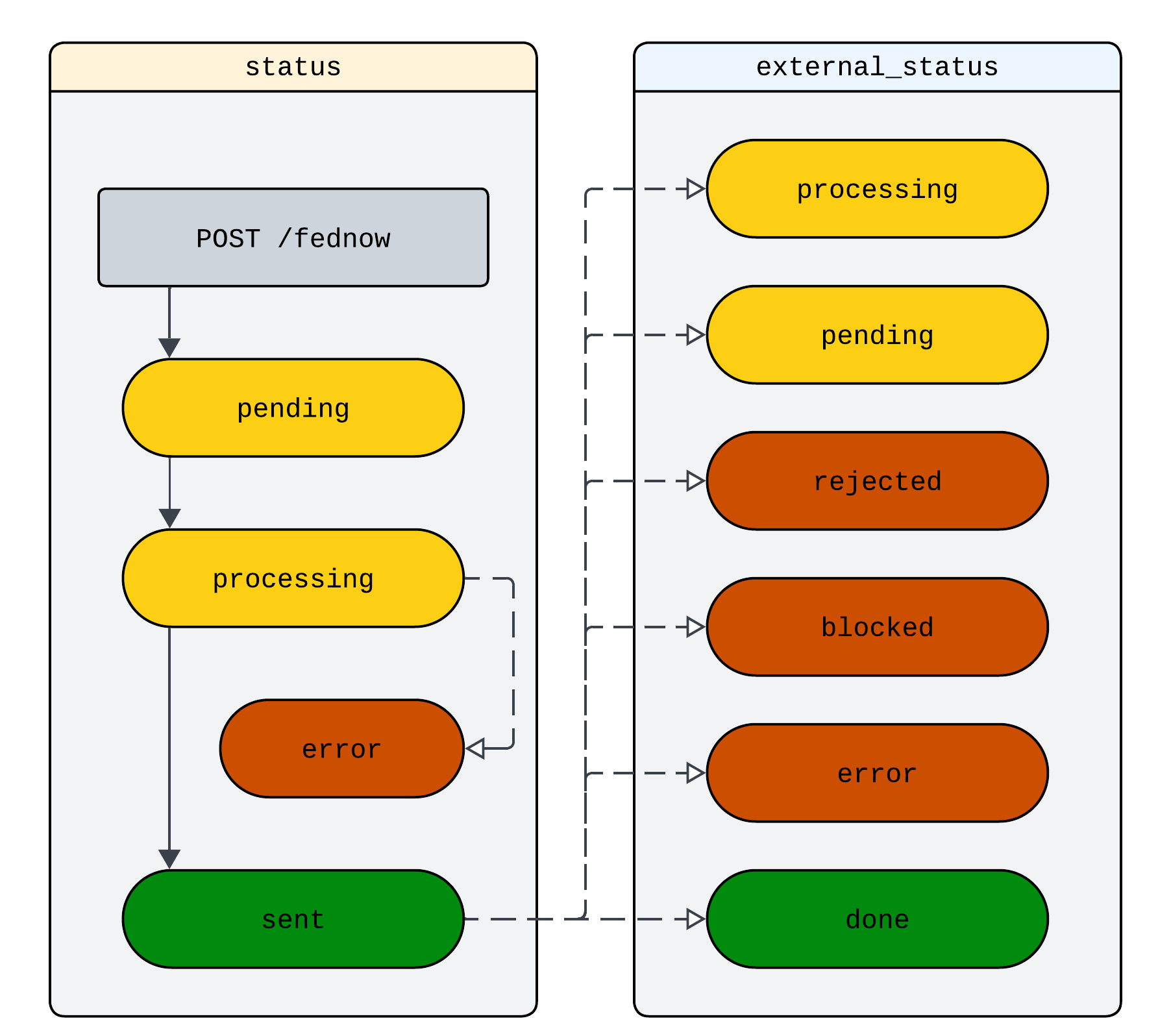 ## FedNow Send scenarios and corresponding statuses
Most FedNow payments are accepted by the receiving financial institution (FI), though some may be rejected or placed in an "Accepted Without Post" status. The table below details the various FedNow Send scenarios with their corresponding `external_status` values.
| Scenario | Description | External Status |
| --------------- | ---------------------------------------------------------------------------------------------------------------------------------------------------------------------------------------------------------------------------------------------------------------------------------------------------------------------------- | --------------- |
| Accepted | FedNow payment successfully sent and accepted by the receiving financial institution (FI). | `done` |
| Rejected | The receiving FI rejected the FedNow payment and will send an inbound payment to return the funds. | `rejected` |
| ACWP | Accepted Without Post (ACWP) means the receiving FI received the payment but did not post the transaction. The receiving FI's staff will manually review the transaction. During this review, the external status remains `pending` until a final decision is reached. There are three possible final outcomes listed below. | `pending` |
| ACWP - Accepted | Receiving FI reviewed and accepted the payment, posting it to the recipient account. | `done` |
| ACWP - Blocked | Receiving FI reviewed and decided not to post the payment, and will not return the payment. | `blocked` |
| ACWP - Rejected | Receiving FI reviewed and rejected the payment. The receiving FI will initiate an inbound FedNow payment to return funds. | `rejected` |
## Handling FedNow returns
While FedNow payments are described as irrevocable, in rare instances, the receiving financial institution may return a payment, typically when payments are rejected. When this happens, you'll see a separate inbound FedNow transaction matching the amount of the original payment, with the `related_fednow_ids` field containing the original payment's ID. You can use this ID to identify the payment as a return and notify the end user. Additionally, the `external_status` on the original payment will update to `rejected`. Note: Not every payment in rejected status will have a return transaction.
### Example of inbound FedNow return transaction with `related_fednow_ids` populated
Below is a return example for the FedNow payment originated in the steps above. Note that the `related_fednow_ids` field contains the original FedNow object ID, allowing you to connect this return with the initial payment.
```json theme={null}
{
"description": null,
"amount": "250.00",
"bank_id": "bank_example",
"related_fednow_ids": [
"fednow_11md3anz1fsags2"
],
"account_id": "acct_11krnje614s6p3j",
"security_context": null,
"fed_settlement_date": "2025-07-03",
"org_id": "org_example",
"payment_type": "credit",
"external_status": null,
"external_reject_reason": null,
"external_routing_number": "011055555",
"updated_at": "2025-09-22T22:42:53Z",
"currency": "USD",
"status": "done",
"id": "fednow_11m6d97w1c3bx8x",
"payment_id": "202507036260600971yMpCkrY8ynQVP5so5",
"external_name": "Adam Smith",
"error": null,
"external_account_number": "110000994433",
"originator_name": null,
"memo": null,
"created_at": "2025-09-22T22:42:52Z"
}
```
## FedNow Send scenarios and corresponding statuses
Most FedNow payments are accepted by the receiving financial institution (FI), though some may be rejected or placed in an "Accepted Without Post" status. The table below details the various FedNow Send scenarios with their corresponding `external_status` values.
| Scenario | Description | External Status |
| --------------- | ---------------------------------------------------------------------------------------------------------------------------------------------------------------------------------------------------------------------------------------------------------------------------------------------------------------------------- | --------------- |
| Accepted | FedNow payment successfully sent and accepted by the receiving financial institution (FI). | `done` |
| Rejected | The receiving FI rejected the FedNow payment and will send an inbound payment to return the funds. | `rejected` |
| ACWP | Accepted Without Post (ACWP) means the receiving FI received the payment but did not post the transaction. The receiving FI's staff will manually review the transaction. During this review, the external status remains `pending` until a final decision is reached. There are three possible final outcomes listed below. | `pending` |
| ACWP - Accepted | Receiving FI reviewed and accepted the payment, posting it to the recipient account. | `done` |
| ACWP - Blocked | Receiving FI reviewed and decided not to post the payment, and will not return the payment. | `blocked` |
| ACWP - Rejected | Receiving FI reviewed and rejected the payment. The receiving FI will initiate an inbound FedNow payment to return funds. | `rejected` |
## Handling FedNow returns
While FedNow payments are described as irrevocable, in rare instances, the receiving financial institution may return a payment, typically when payments are rejected. When this happens, you'll see a separate inbound FedNow transaction matching the amount of the original payment, with the `related_fednow_ids` field containing the original payment's ID. You can use this ID to identify the payment as a return and notify the end user. Additionally, the `external_status` on the original payment will update to `rejected`. Note: Not every payment in rejected status will have a return transaction.
### Example of inbound FedNow return transaction with `related_fednow_ids` populated
Below is a return example for the FedNow payment originated in the steps above. Note that the `related_fednow_ids` field contains the original FedNow object ID, allowing you to connect this return with the initial payment.
```json theme={null}
{
"description": null,
"amount": "250.00",
"bank_id": "bank_example",
"related_fednow_ids": [
"fednow_11md3anz1fsags2"
],
"account_id": "acct_11krnje614s6p3j",
"security_context": null,
"fed_settlement_date": "2025-07-03",
"org_id": "org_example",
"payment_type": "credit",
"external_status": null,
"external_reject_reason": null,
"external_routing_number": "011055555",
"updated_at": "2025-09-22T22:42:53Z",
"currency": "USD",
"status": "done",
"id": "fednow_11m6d97w1c3bx8x",
"payment_id": "202507036260600971yMpCkrY8ynQVP5so5",
"external_name": "Adam Smith",
"error": null,
"external_account_number": "110000994433",
"originator_name": null,
"memo": null,
"created_at": "2025-09-22T22:42:52Z"
}
```