> ## Documentation Index
> Fetch the complete documentation index at: https://docs.treasuryprime.com/llms.txt
> Use this file to discover all available pages before exploring further.
# Card Auth Loop Endpoint
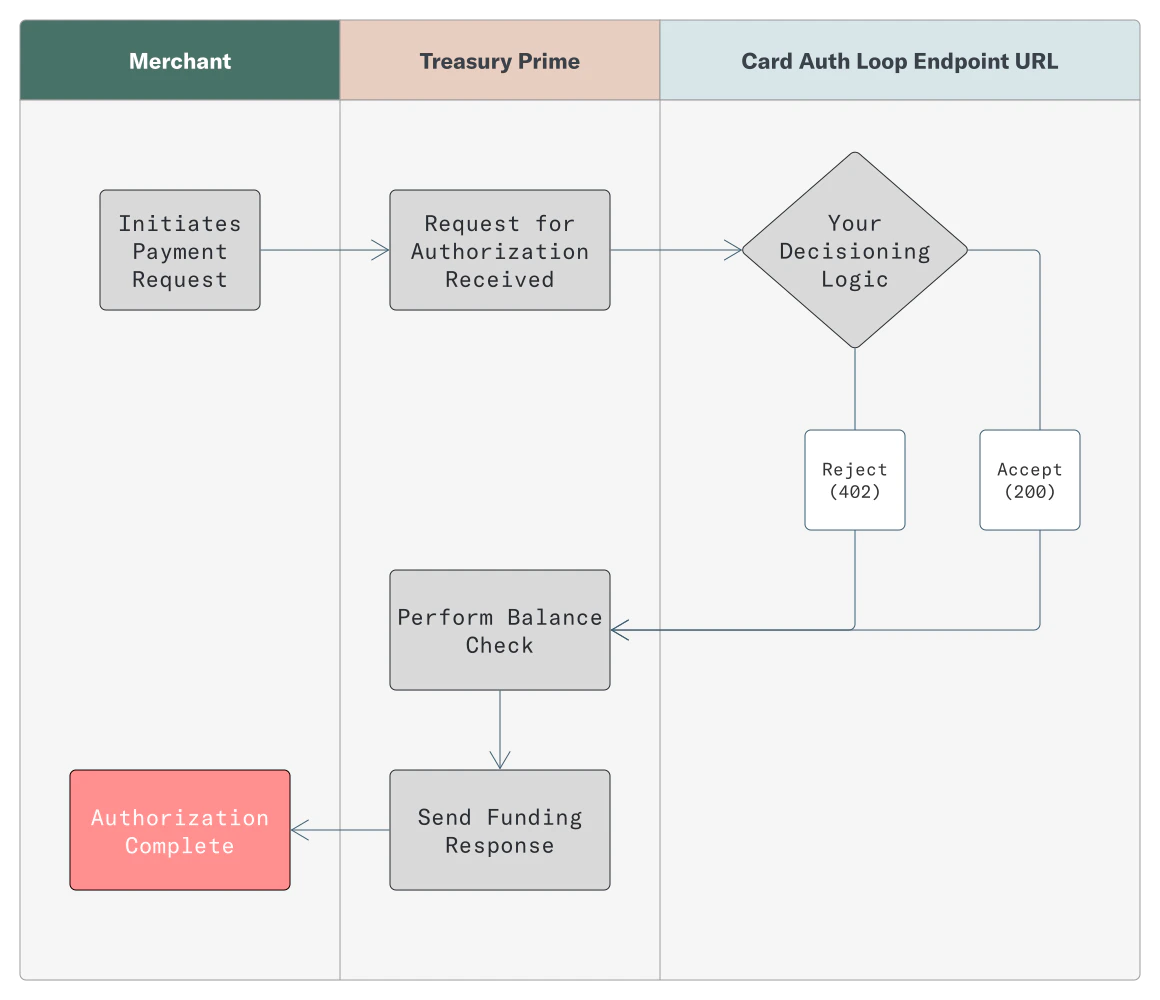
> The Card Auth Loop Endpoint allows you to accept or reject a card transaction at the time of authorization based on your business logic. To accomplish this, you assign the Card Auth Loop Endpoint to the Card Product whose card authorization requests you want to monitor. From there, any time a new authorization or refund authorization request is received for a card created using that Card Product, you will receive a callback at the URL specified in the Card Auth Loop Endpoint object.
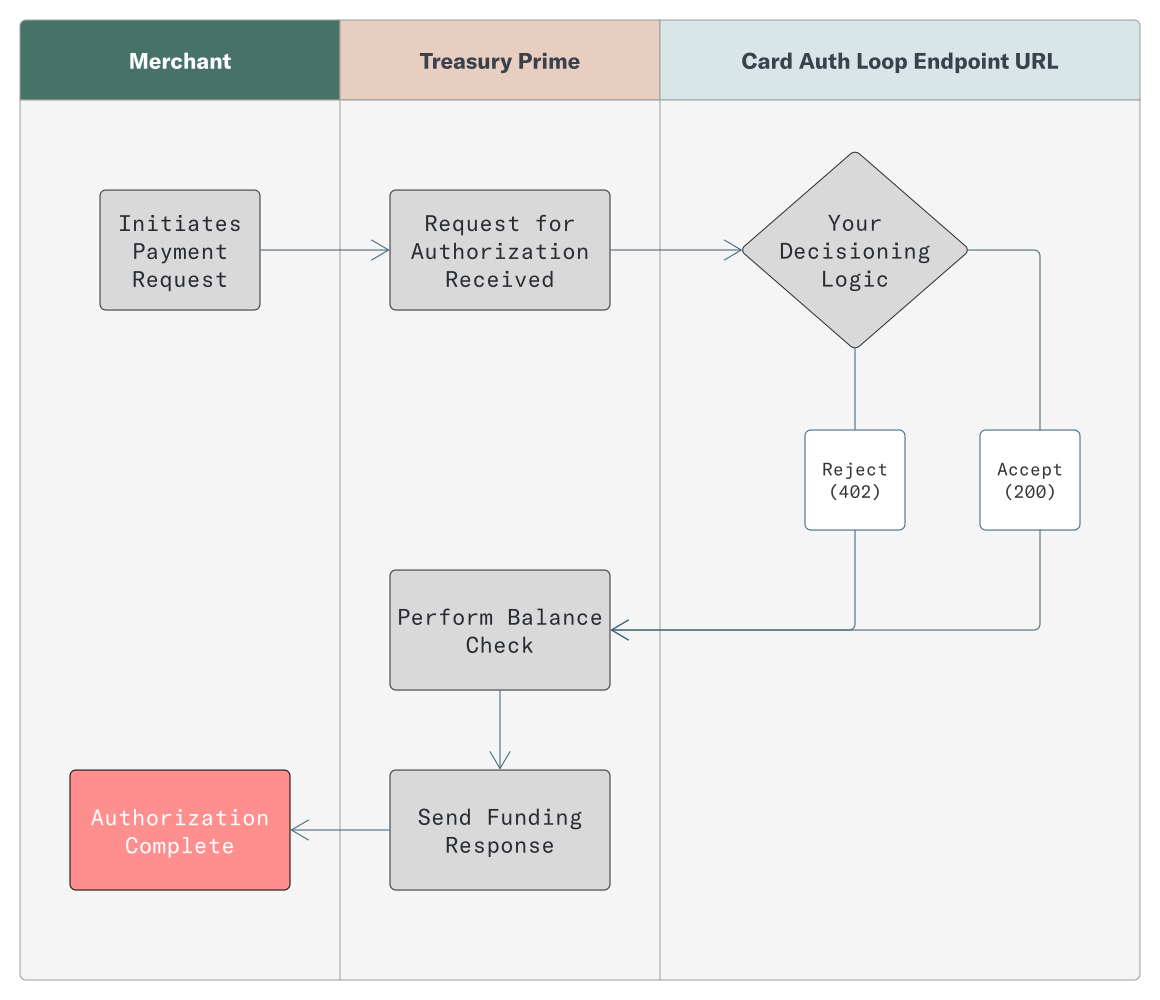
The general flow for authorization using the Card Auth Loop Endpoint (CALE) is shown below:
 ## Testing in the Developer Sandbox
1. **Whitelist Treasury Prime's IP addresses** in your firewall or network security rules to ensure your server can receive incoming Card Auth Loop Endpoint callbacks. Contact [Treasury Prime Support](mailto:help@treasuryprime.com) for the current list of IPs to whitelist.
2. Create a new [Card Auth Loop Endpoint](/reference/card-auth-loop-endpoint).
3. Update the `card_auth_loop_endpoint_id` of the [Card Product](/reference/card-product) you would like to receive authorization requests for with the `id` of the Card Auth Loop Endpoint you created.
4. Create a new `card_event.auth_request` [Card Simulation](/reference/card-simulations) to mimic a card authorization taking place.
5. An HTTP POST request will be sent to the URL listed in the Card Auth Loop Endpoint containing an `auth-request` Card Event in the message body (example below).
6. You now have 1500 milliseconds to respond with a 200 (to approve the request) or a 402 (to reject the request).
7. If you do not respond, the `default_response` set in the Card Auth Loop Endpoint will take effect. Please see the warnings below.
## Testing in Production
1. **Whitelist Treasury Prime's production IP addresses** in your firewall or network security rules to ensure your server can receive incoming Card Auth Loop Endpoint callbacks. Contact [Treasury Prime Support](mailto:help@treasuryprime.com) for the current list of IPs if you have not already done so.
2. Create a new [Card Auth Loop Endpoint](/reference/card-auth-loop-endpoint).
3. Update the `card_auth_loop_endpoint_id` of the [Card Product](/reference/card-product) you would like to receive authorization requests for with the `id` of the Card Auth Loop Endpoint you created.
4. Initiate authorization by swiping or submitting a virtual payment using a card issued under the Card Product from step 2.
5. An HTTP POST request will be sent to the URL listed in the Card Auth Loop Endpoint containing an `auth-request` Card Event in the message body (example below).
6. You now have 1500 milliseconds to respond with a 200 (to approve the request) or a 402 (to reject the request).
7. If you do not respond, the `default_response` set in the Card Auth Loop Endpoint will take effect. Please see the warnings below.
## Card Auth Loop Endpoint Default Response
You can set the `default_response` to `"approved"` or `"denied"`, with the standard setting being `"approved"`.
Most of the time this setup is fine. If there is a timeout the card still works as long as there is enough money in the account. However, if you set `default_response` to `"denied"` and your CALE system goes offline then every single card swipe gets rejected. No exceptions. That is the tradeoff.
## Example Card Auth Loop Endpoint Callback
When a card authorization request is received, an HTTP POST will be sent to the URL specified in the Card Auth Loop Endpoint object. The POST body contains a [Card Event](/docs/card-events) object as shown below.
```bash bash theme={null}
{
"message_type": "auth-request",
"amount": "25.00",
"bank_id": "bank_treasuryprime",
"org_id": "org_1evy4cx23n5",
"decline_reason": null,
"updated_at": "2022-05-26T19:43:05Z",
"currency": "USD",
"status": "pending",
"id": "cnm_11h8zp29ahk22d",
"card_id": "card_11h84t45a4d26",
"trace_id": "aec7df65adb14c34989384d0hh44f897",
"network": "mastercard",
"network_created_at": null,
"merchant": {
"name": "Card Transaction Test 1",
"mcc": "3501",
"mid": "4445025949033",
"address": {
"city": "LAS VEGAS",
"state": "NV",
"postal_code": "88901",
"country": "USA"
}
},
"processor": "marqeta",
"networkdata": null,
"created_at": "2022-05-26T19:43:05Z",
"atm": null
}
```
## Distinguishing Original Credit Transactions (OCT)
Original Credit Transactions (OCTs) — such as disbursements from third-party services — also trigger Card Auth Loop Endpoint callbacks. The `message_type` field in the callback payload distinguishes these from regular spending authorizations:
* `auth-request` — Regular spending authorization (money leaving the account)
* `original-credit-auth-request` — OCT authorization (money arriving to the account)
* `original-credit-auth-clear-request` — OCT authorization and capture in one message
You can use the `message_type` field to apply different business logic for incoming credits. For example, you may choose to skip balance checks for OCTs since they represent funds being added to the account rather than spent.
## Testing in the Developer Sandbox
1. **Whitelist Treasury Prime's IP addresses** in your firewall or network security rules to ensure your server can receive incoming Card Auth Loop Endpoint callbacks. Contact [Treasury Prime Support](mailto:help@treasuryprime.com) for the current list of IPs to whitelist.
2. Create a new [Card Auth Loop Endpoint](/reference/card-auth-loop-endpoint).
3. Update the `card_auth_loop_endpoint_id` of the [Card Product](/reference/card-product) you would like to receive authorization requests for with the `id` of the Card Auth Loop Endpoint you created.
4. Create a new `card_event.auth_request` [Card Simulation](/reference/card-simulations) to mimic a card authorization taking place.
5. An HTTP POST request will be sent to the URL listed in the Card Auth Loop Endpoint containing an `auth-request` Card Event in the message body (example below).
6. You now have 1500 milliseconds to respond with a 200 (to approve the request) or a 402 (to reject the request).
7. If you do not respond, the `default_response` set in the Card Auth Loop Endpoint will take effect. Please see the warnings below.
## Testing in Production
1. **Whitelist Treasury Prime's production IP addresses** in your firewall or network security rules to ensure your server can receive incoming Card Auth Loop Endpoint callbacks. Contact [Treasury Prime Support](mailto:help@treasuryprime.com) for the current list of IPs if you have not already done so.
2. Create a new [Card Auth Loop Endpoint](/reference/card-auth-loop-endpoint).
3. Update the `card_auth_loop_endpoint_id` of the [Card Product](/reference/card-product) you would like to receive authorization requests for with the `id` of the Card Auth Loop Endpoint you created.
4. Initiate authorization by swiping or submitting a virtual payment using a card issued under the Card Product from step 2.
5. An HTTP POST request will be sent to the URL listed in the Card Auth Loop Endpoint containing an `auth-request` Card Event in the message body (example below).
6. You now have 1500 milliseconds to respond with a 200 (to approve the request) or a 402 (to reject the request).
7. If you do not respond, the `default_response` set in the Card Auth Loop Endpoint will take effect. Please see the warnings below.
## Card Auth Loop Endpoint Default Response
You can set the `default_response` to `"approved"` or `"denied"`, with the standard setting being `"approved"`.
Most of the time this setup is fine. If there is a timeout the card still works as long as there is enough money in the account. However, if you set `default_response` to `"denied"` and your CALE system goes offline then every single card swipe gets rejected. No exceptions. That is the tradeoff.
## Example Card Auth Loop Endpoint Callback
When a card authorization request is received, an HTTP POST will be sent to the URL specified in the Card Auth Loop Endpoint object. The POST body contains a [Card Event](/docs/card-events) object as shown below.
```bash bash theme={null}
{
"message_type": "auth-request",
"amount": "25.00",
"bank_id": "bank_treasuryprime",
"org_id": "org_1evy4cx23n5",
"decline_reason": null,
"updated_at": "2022-05-26T19:43:05Z",
"currency": "USD",
"status": "pending",
"id": "cnm_11h8zp29ahk22d",
"card_id": "card_11h84t45a4d26",
"trace_id": "aec7df65adb14c34989384d0hh44f897",
"network": "mastercard",
"network_created_at": null,
"merchant": {
"name": "Card Transaction Test 1",
"mcc": "3501",
"mid": "4445025949033",
"address": {
"city": "LAS VEGAS",
"state": "NV",
"postal_code": "88901",
"country": "USA"
}
},
"processor": "marqeta",
"networkdata": null,
"created_at": "2022-05-26T19:43:05Z",
"atm": null
}
```
## Distinguishing Original Credit Transactions (OCT)
Original Credit Transactions (OCTs) — such as disbursements from third-party services — also trigger Card Auth Loop Endpoint callbacks. The `message_type` field in the callback payload distinguishes these from regular spending authorizations:
* `auth-request` — Regular spending authorization (money leaving the account)
* `original-credit-auth-request` — OCT authorization (money arriving to the account)
* `original-credit-auth-clear-request` — OCT authorization and capture in one message
You can use the `message_type` field to apply different business logic for incoming credits. For example, you may choose to skip balance checks for OCTs since they represent funds being added to the account rather than spent.