> ## Documentation Index
> Fetch the complete documentation index at: https://docs.treasuryprime.com/llms.txt
> Use this file to discover all available pages before exploring further.
# Plaid Payments Integration
> Treasury Prime has partnered with to offer our customers a seamless solution for sending ACH payments to authenticated bank accounts.
Rather than handling account and routing numbers directly, you can use [Plaid Link](https://plaid.com/docs/link/) to enable your users to instantly authenticate their external bank account information. Once authenticated, you can create a Plaid `processor_token` which can be sent to Treasury Prime as part of the [Counterparty](/reference/get_counterparty) object in place of account and routing numbers.
More information on using Plaid’s Treasury Prime Integration–including sample code–can be found at [https://plaid.com/docs/auth/partnerships/treasury-prime/](https://plaid.com/docs/auth/partnerships/treasury-prime/)
## Production Implementation
The requirements for implementing the Plaid integration for Treasury Prime largely revolve around the configuration and use of the [Plaid Link](https://plaid.com/docs/link/) client-side component. This topic is covered in great detail in [Plaid’s documentation](https://plaid.com/docs/) and in the examples provided in their [Treasury Prime integration guide](https://plaid.com/docs/auth/partnerships/treasury-prime/). It is recommended that you review these documents in order to understand the process of implementing Plaid Link and obtaining a `processor_token` prior to beginning this guide.
Once you have completed the steps to authenticate your user using Plaid Link and have obtained a `processor_token`, you are ready to create a Counterparty which can be used to send ACH payments to the linked account. Note in the example below that you are not required to pass an account or routing number when creating the Counterparty, just the `plaid_processor_token`. When the Counterparty is created, Treasury Prime will exchange this token with Plaid to obtain the necessary details to send payments to the linked account.
##### Example Request to Create a Counterparty using a Plaid `processor_token`
```bash bash theme={null}
curl -u $API_KEY_ID:$API_SECRET_KEY 'https://api.sandbox.treasuryprime.com/counterparty' \
-H 'Content-Type: application/json' \
-d '{
"name_on_account": "Jim Plaidly",
"plaid_processor_token": "processor-sandbox-12345678-a94b-4eea-80b8-abcdefg94abc"
}'
```
##### Example Response
```bash bash theme={null}
{
"created_at": "2022-07-01T14:03:36Z",
"updated_at": "2022-07-01T14:03:36Z",
"ach": {
"account_number": "1111222233330000",
"account_type": "checking",
"routing_number": "011401532"
},
"wire": null,
"name_on_account": "Jim Plaidly",
"plaid_processor_token": "processor-sandbox-12345678-a94b-4eea-80b8-abcdefg94abc",
"id": "cp_11aa22bbbbqpyx",
"userdata": null
}
```
## Supported Payment Types
The Plaid `processor_token` can be used in the creation of counterparties for sending [ACH payments](/reference/ach) only. The integration with Plaid does not currently support the creation of counterparties used for sending wires.
## Testing in Sandbox
[https://plaid.com/docs/api/sandbox/](https://plaid.com/docs/api/sandbox/)
While you can test the Treasury Prime Plaid Integration in the [Developer Sandbox](https://app.sandbox.treasuryprime.com/sign_up) using the same steps outlined above for the production environment, Plaid has provided some shortcuts in their own sandbox environment to make generating and testing a `processor_token` even easier. The steps below outline the process of creating a Plaid `processor_token` without requiring the integration and use of the Plaid Link component. This is useful for initial testing and prototyping while working in the Treasury Prime Developer Sandbox, but will not function in a production environment. The steps for obtaining the Plaid `processor_token` and creating a Counterparty object using the Plaid and Treasury Prime sandbox environments are outlined below.
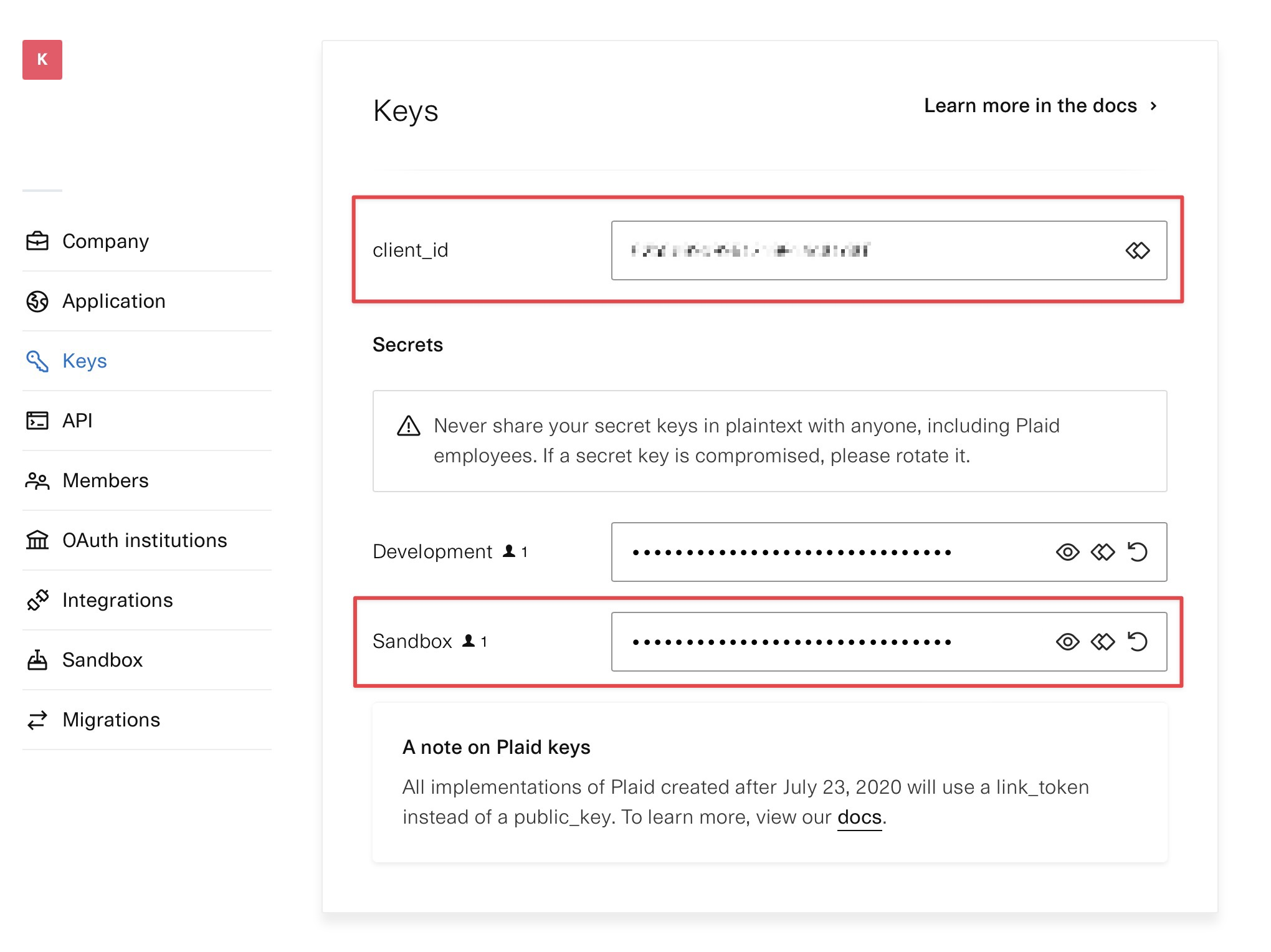
### 1. Retrieve `client_id` and Secret for Plaid Sandbox
Log into your Plaid account, and locate the `client_id` and sandbox `secret` from the [dashboard](https://dashboard.plaid.com/team/keys). If you do not already have a Plaid account, you can [create one here](https://dashboard.plaid.com/signup).
### 2. Create Plaid `public_token`
##### Example Request
```bash bash theme={null}
curl -L -X POST 'https://sandbox.plaid.com/sandbox/public_token/create' \
-H 'Content-Type: application/json' \
-d '{
"client_id": "plaid_client_id",
"secret": "plaid_secret",
"institution_id": "ins_3",
"initial_products": ["auth"],
"options": {
"webhook": "https://www.genericwebhookurl.com/webhook"
}
}'
```
##### Example Response
```bash bash theme={null}
{
"public_token": "public-sandbox-123ee5c3-456f-4e91-8ee9-7895c2fabcde",
"request_id": "AiJya50u9RGa012"
}
```
### 3. Exchange Plaid `public_token` for `access_token`
##### Example Request
```bash bash theme={null}
curl -L -X POST 'https://sandbox.plaid.com/item/public_token/exchange' \
-H 'Content-Type: application/json' \
-d '{
"client_id": "plaid_client_id",
"secret": "plaid_secret",
"public_token": "public-sandbox-123ee5c3-456f-4e91-8ee9-7895c2fabcde"
}'
```
##### Example Response
```bash bash theme={null}
{
"access_token": "access-sandbox-123456db-6ee3-4f18-b235-78901242106e",
"item_id": "1234omG8jaldieEA1NEUDaZbVJv4mLulNGabc",
"request_id": "1234h6ZVYpKSabc"
}
```
### 4. Get Plaid `account_id`
##### Example Request
```bash bash theme={null}
curl -L -X POST 'https://sandbox.plaid.com/accounts/get' \
-H 'Content-Type: application/json' \
--data-raw '{
"client_id": "plaid_client_id",
"secret": "plaid_secret",
"access_token": "access-sandbox-123456db-6ee3-4f18-b235-78901242106e"
}'
```
##### Example Response
```bash bash theme={null}
{
"accounts": [
{
"account_id": "1234abcd5GHDzL4lpz4BfmKvNKMRjns35678",
"balances": {
"available": 100,
"current": 110,
"iso_currency_code": "USD",
"limit": null,
"unofficial_currency_code": null
},
"mask": "0000",
"name": "Plaid Checking",
"official_name": "Plaid Gold Standard 0% Interest Checking",
"subtype": "checking",
"type": "depository"
},
...
]
...
}
```
### 5. Create Plaid `processor_token`
##### Example Request
```bash bash theme={null}
curl -L -X POST 'https://sandbox.plaid.com/processor/token/create' \
-H 'Content-Type: application/json' \
-d '{
"client_id": "plaid_client_id",
"secret": "plaid_secret",
"access_token": "access-sandbox-123456db-6ee3-4f18-b235-78901242106e",
"account_id": "1234abcd5GHDzL4lpz4BfmKvNKMRjns35678",
"processor": "treasury_prime"
}'
```
##### Example Response
```bash bash theme={null}
{
"processor_token": "processor-sandbox-37e03d34-03ac-404f-a99b-5c24763a73d5",
"request_id": "cdbGEcRCCel5Tp8"
}
```
### 6. Create Treasury Prime Counterparty using Plaid `processor_token`
##### Example Request
```bash bash theme={null}
curl -u $API_KEY_ID:$API_SECRET_KEY 'https://api.sandbox.treasuryprime.com/counterparty' \
-H 'Content-Type: application/json' \
-d '{
"name_on_account": "Jim Plaidly",
"plaid_processor_token": "processor-sandbox-12345678-a94b-4eea-80b8-abcdefg94abc"
}'
```
##### Example Response
```bash bash theme={null}
{
"created_at": "2022-07-01T14:03:36Z",
"updated_at": "2022-07-01T14:03:36Z",
"ach": {
"account_number": "1111222233330000",
"account_type": "checking",
"routing_number": "011401532"
},
"wire": null,
"name_on_account": "Jim Plaidly",
"plaid_processor_token": "processor-sandbox-12345678-a94b-4eea-80b8-abcdefg94abc",
"id": "cp_11aa22bbbbqpyx",
"userdata": null
}
```
### 7. Create payment using Counterparty ID
##### Example Request (ACH credit)
```bash bash theme={null}
curl -u $API_KEY_ID:$API_SECRET_KEY 'https://api.sandbox.treasuryprime.com/ach' \
-H 'Content-Type: application/json' \
-d '{
"account_id": "acct_1234dk7n699ges",
"amount": "100.00",
"counterparty_id": "cp_11aa22bbbbqpyx",
"direction": "credit",
"sec_code": "ccd"
}'
```
##### Example Response
```bash bash theme={null}
{
"description": null,
"amount": "100.00",
"service": "standard",
"counterparty_id": "cp_11aa22bbbbqpyx",
"bankdata": null,
"bank_id": "bank_treasuryprime",
"account_id": "acct_1234dk7n699ges",
"addenda": [],
"org_id": "org_12345cx2km5",
"batch_key": null,
"effective_date": "2022-07-01",
"updated_at": "2022-07-01T18:24:25Z",
"status": "pending",
"id": "ach_11223344bc0frc",
"error": null,
"sec_code": "ccd",
"scheduled_settlement": null,
"direction": "credit",
"created_at": "2022-07-01T18:24:25Z",
"userdata": null
}
```