

Types of ACH Transfers
ACH supports two types of transfers: credit and debit. Also referred to as the “direction” of the transfer, the type of transfer selected determines whether the funds are pushed to a recipient’s account, or pulled from their account.ACH Credit
An ACH credit is used when you wish to send or “push” funds to a recipient. An example of an ACH credit transaction is payroll direct deposit, where an employer credits funds to an employee’s account.Lifecycle of an Originated ACH Credit
- A balance check is performed on the originating account to ensure sufficient funds are available to cover the transaction.
- The ACH object is created with an initial
statusofpending. - A hold is placed on the originating account to secure the funds for the transaction.
- The ACH
statustransitions toprocessing, the initial hold is released, and a withdrawal is made from the funding account. - The
statusof the ACH transitions tosentand the NACHA file containing the ACH is sent to the bank for processing. - Finally, the funds are deposited into the recipient’s bank account.
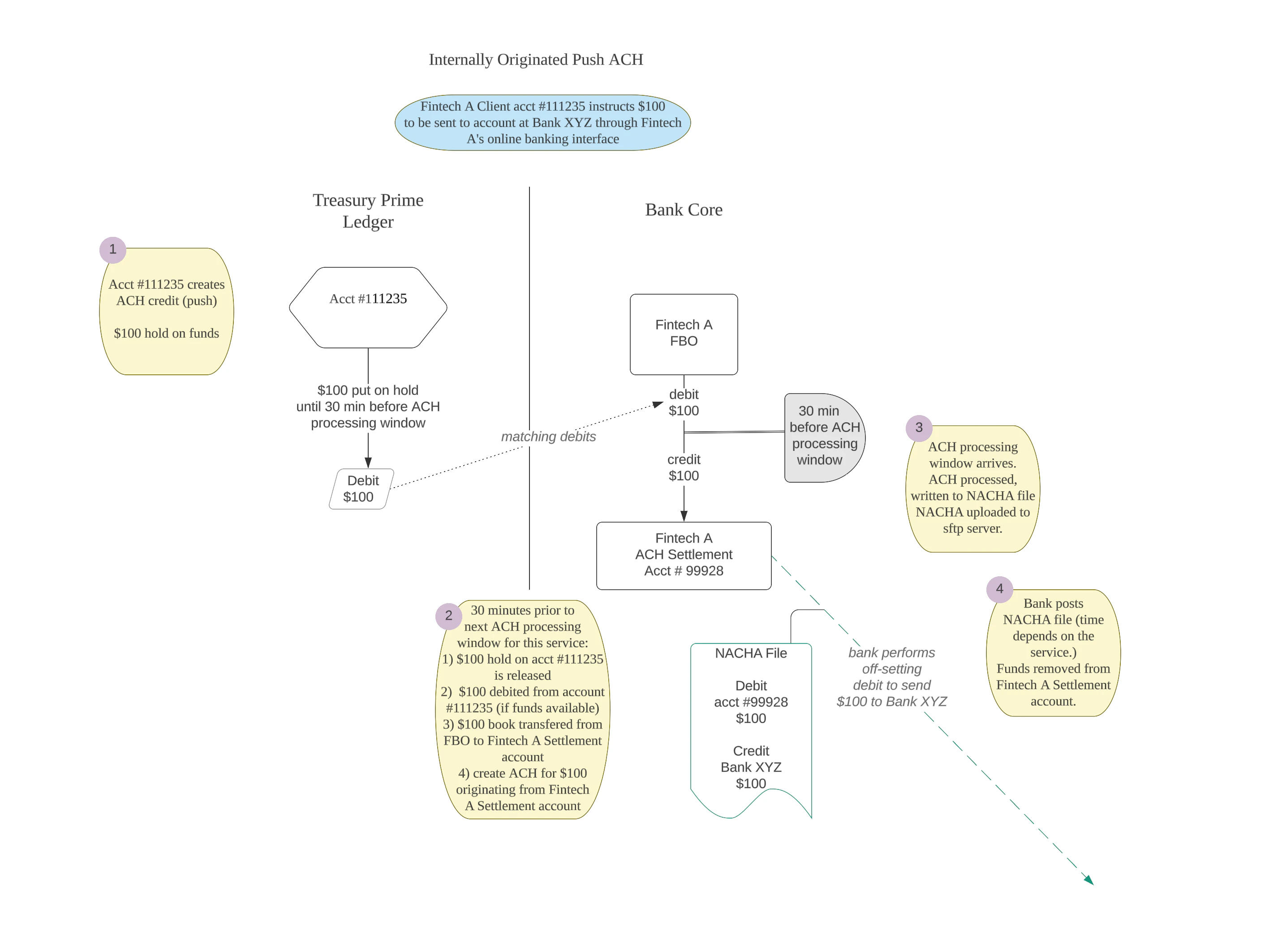
Note that the timing of status changes and funds availability varies by bank and by ACH service. See the the section on ACH timing below for more detail.
ACH Debit
An ACH debit is used when you wish to “pull” funds from an external account. Bill Payments, where a merchant is given permission to pull funds from their customer’s account, is one example of where an ACH debit might be used.Note: Originated debit ACHs at or above your bank’s ACH Flag Review Threshold are flagged for banker review under Treasury Prime’s NACHA fraud-monitoring program. Flagging does not delay processing.
Lifecycle of an originated ACH Debit
- The ACH object is created with an initial
statusofpending. - The ACH
statustransitions toprocessing. - The
statusof the ACH is updated tosentand thescheduled_settlementvalue is set. - The NACHA file containing the ACH is sent to the bank for processing.
- Finally, the funds are deposited into the originating bank account.
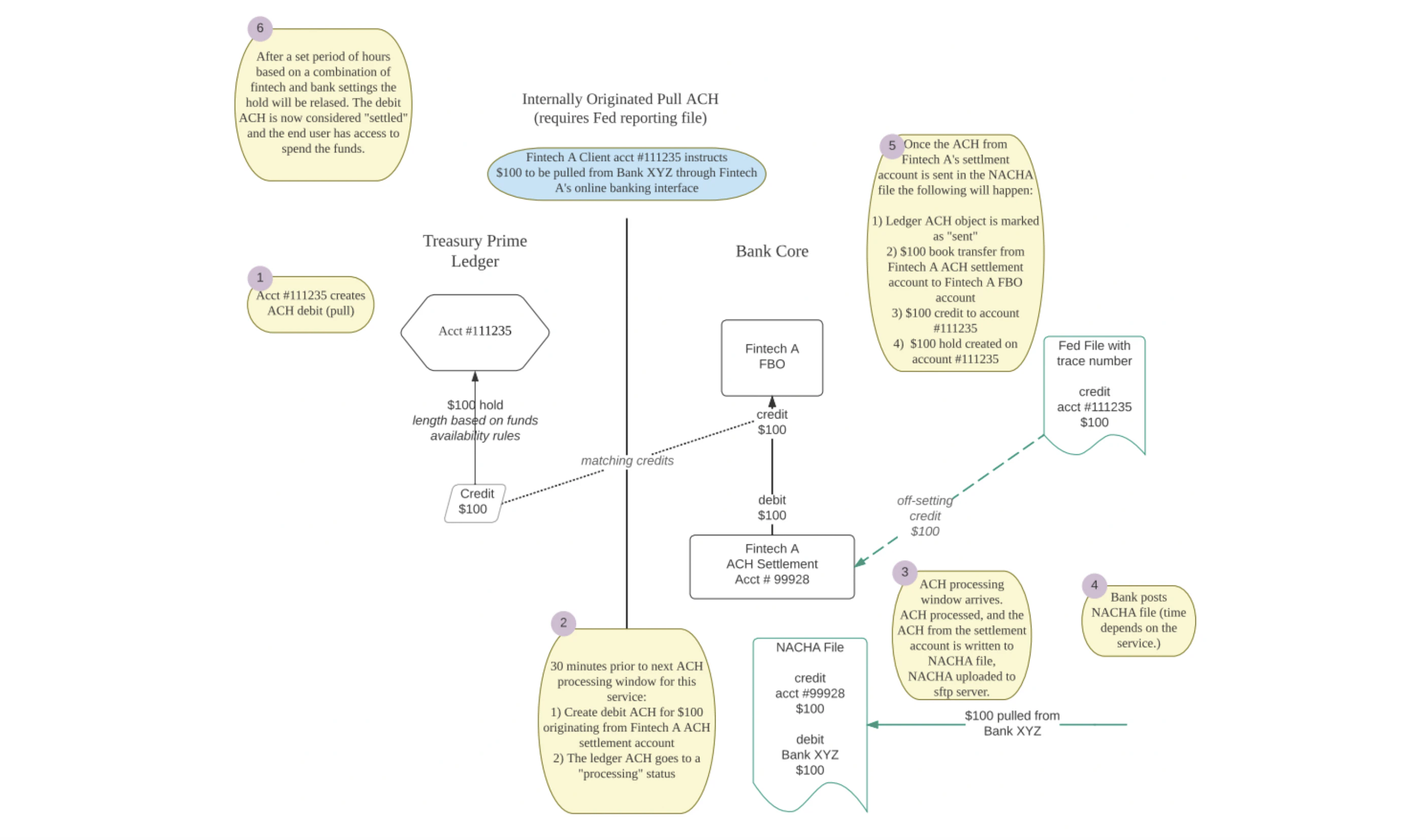
How Long Does an ACH Take?
The topic of how long it will take for funds to be received when sending an ACH is a bit complex and often ends in statements like “it depends”. To help clarify this, let’s look at the key factors that determine just how long it will take for the funds from an ACH to be received.Service Level
ACH supports two levels of service—standard and sameday—which ultimately determine how fast the ACH will settle. While the type of ACH (credit or debit), and the processes defined by the Receiving Depository Financial Institution (RDFI) also play a role in settlement time, the general timelines for standard and sameday ACH processing are as follows:
Note that ACH transactions are only processed during business banking days, so you will need to keep this in mind when assessing transfer timelines.
Submission Time
As a matter of practice, ACH transfers are processed in batches by the ODFI (Originating Depository Financial Institution) at set intervals throughout the day. The times at which these batches are processed, known as “processing windows,” are defined by each ODFI, so it is recommended you speak with your Customer Success Manager or Bank Partner(s) to understand the specific timings defined by your partner bank(s). It’s also worth noting that there are separate processing windows for standard and sameday ACH transfers. In order for an ACH to be included in a specific processing window, it needs to be submitted prior to the cut-off time for that window. Treasury Prime defines cut-off times as being 30 minutes prior to the scheduled start of the processing window. To bring this all together, let’s look at the example of a made-up ODFI, Prime Bank.Prime Bank ACH Processing Windows
Prime Bank offers three ACH processing windows each day: one for standard ACH transfers, and two for sameday ACH transfers. In order for a sameday ACH to be included in the 12:30 processing window, the ACH would need to be created prior to the 12:00 cut-off time. If the cut-off window is missed, then the ACH will be included in the next processing window, which in this case would be 11:30 the following business day (as 12:30 is the final processing window for sameday transfers).
Direction
The direction of the ACH also plays a role in determining how long the transfer will take to complete. Specifically, ACH debits tend to take a bit longer than their credit counterparts. Let’s take a quick look at why this is, and how it affects ACH processing. As it is unknown whether sufficient funds will be available in the account when an ACH debit is initiated, there is an additional level of potential fraud risk introduced in this type of ACH payment. To counteract this, and aid in fraud prevention, ACH debits include a delayed settlement period (imposed by the ODFI) prior to releasing funds to the recipient’s account. This delay provides the RDFI an opportunity to fulfill the debit request and, if necessary, respond with an error. While the length of this delay can vary de on the arrangements made with your bank partner, funds forsameday ACHs are generally released to the recipient after 48 business hours, and standard ACHs after 72 business hours.
For ACH debit transfers originating from Treasury Prime ledger accounts, the ACH object will be populated with a scheduled_settlement value defining when the funds are expected to become available in the recipient’s account. This value is set when the ACH reaches a status of processed and will take into account the service level selected and any other variables involved in the ACH settlement timing.
Limits on Total ACH Transaction Amounts
A set of velocity limits exists for debit and credit ACH transfers which limit the total dollar amount that can be transacted for each transfer type within a rolling 24-hour period. These limits are defined by your bank partner and can be adjusted with approval from the bank. While separate limits exist for debit and credit ACHs, there is no differentiation among service levels, so both sameday and standard ACHs will count against the daily limit for each type. The timestamp supplied in thecreated_at property of the ACH object is used to determine which transactions are included within the rolling 24-hour limit. Canceled ACH transactions do not count toward this limit. When these limits are exceeded a 429 status error is returned with a message describing the specific limit exceeded.
ACH Flag Review Threshold
In addition to standard ACH limits (per-transaction or daily), Treasury Prime also supports an ACH Flag Review Threshold. Originated debit ACHs at or above this amount are flagged for banker review under our NACHA fraud-monitoring program. Unlike hard limits, the flag threshold does not block transactions — it routes them for post-creation review. Default is $10,000.What Data Will Be Shown to ACH Recipients?
The short answer to this question is “it depends”. There are a number of parties involved in the processing of ACH transfers, and each plays a role in determining what information is or is not displayed to the end user. For ACH transfers initiated on the Treasury Prime platform, thedescription and addenda fields are passed with the transaction; however, whether this information is displayed to the recipient is solely up to the RDFI. As shown in the example below, the recipient of the ACH might see “Test ACH” show up in their banking application, or they might not. It’s up to the RDFI.
Monitoring the status of an ACH
Thestatus field of the ACH object represents the current status of the ACH transfer. You can monitor changes to this status (and thus the processing of the ACH) by subscribing to the ach.update webhook. It’s important to note that unless an ACH is returned or encounters an error during processing then sent will be its terminal status. This is because the ACH network does not support sending updates to confirm the receipt of funds or the successful completion of a transfer after it has been sent for processing. If an error is encountered or an ACH is returned, then the status will be updated accordingly. Otherwise, a successful ACH will end in a status of sent.
SEC codes
Thesec_code field on the ACH object specifies the type of transfer according to the ACH network. Treasury Prime supports the following SEC codes:
Not all SEC codes are available at every bank. Contact your relationship manager to discuss which SEC codes are supported by your bank partner.
Tracking originated ACH payments with trace numbers
Tracking originated ACH Payment with Trace numbers availability varies by bank partner. Contact your relationship manager to discuss availability and any associated costs.
trace_number field on the ACH object provides the 15-digit trace number assigned by the originating bank when an ACH payment is sent. You can use this field to track and reconcile specific originated ACH payments.
The trace number is populated after receiving verification of a sent ACH from the originating bank. (Note this is only available at certain bank partners.) To retrieve it, make a GET request to the /ach/:id endpoint:
trace_number field:
trace_number field is also available in Prime Data alongside other ACH fields, so you can query it directly from the data warehouse for reporting, reconciliation, and analytics workflows without going through the API.
You can also filter by trace_number when listing ACH transfers via GET /ach:
Filtering ACH transfers by direction
You can filter ACH transfers bydirection when listing transfers via the GET /ach endpoint. This allows you to retrieve only credit or only debit transfers:
Identifying transactions related to an ACH
There are two fields that are used to map an ACH to the related transaction(s) that are generated as part of the payment flow. The first,trace_id, can be used to surface all transactions related to a particular ACH (including hold, hold_release, withdrawal, and deposit transactions).
The second field, ach_id is used to identify only transactions that resulted in the movement of funds (a withdrawal or deposit). For transactions that did not result in funds movement (such as a hold, or hold_release) the ach_id field will be null.
Note that the values for both of the
trace_id and ach_id fields will be the id of the originating ACH object.