

Required Bank Inputs
- “Per-org” Check Issuing Settlement account: each fintech customer enabled for check issuing will have their own check issuing specific settlement account.
- Account Closure Check Issuing Settlement account: every bank will establish a settlement account in its own name for the purpose of closing acounts. To learn more about this account, please refer to our: Account Closure Guide
- FBO Account: This account is needed for end-to-end testing purposes. Once the FBO account is opened, Treasury Prime will create a test ledger for testing, and deposit funds into the ledger account.
- Dollar limits issued per-check unit: If this field is set to null, the value will default to 3,000. However, if we have a “good funds model” provided, it will default to a per-check unit limit of $100,000.
- Issued Check Report: The bank will provide Treasury Prime with a daily report of all issued checks in CSV format. (This is only necessary for banks that don’t use the Bank Console to review and manage checks; to see the required format, click on the link)
- Cleared Check Report: The bank will provide Treasury Prime with a daily report of all cleared checks in CSV format. (This is only necessary for banks that don’t use the Bank Console to review and manage checks; to see the required format, click on the link)
Funds flow
The check settlement account number is populated on the MICR line of the check
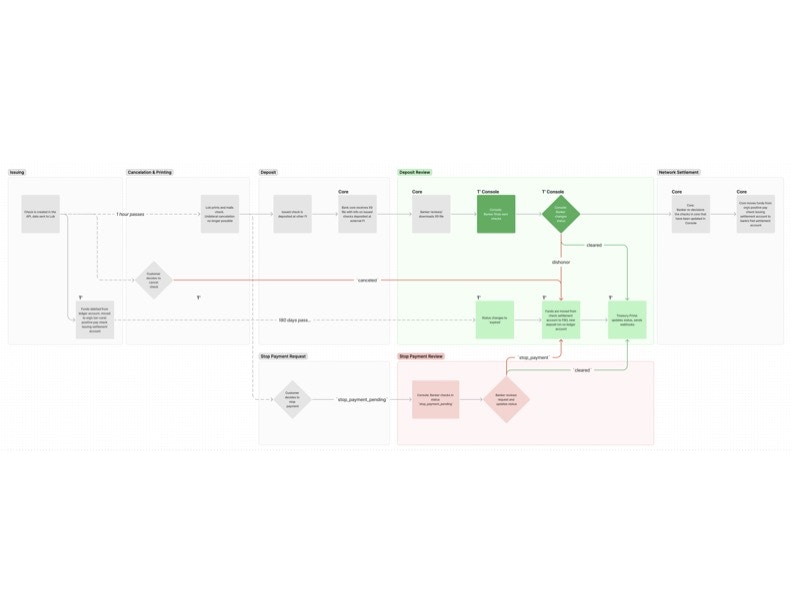
- A fintech customer can use Treasury Prime’s API to create a new issued check object. The customer needs to provide a payload that describes the check, including a memo and message (if desired), as well as metadata on the originating account and the amount transferred to the recipient. Once this data is received, Treasury Prime records a
created_attimestamp on the check object and the check is immediately put into apendingstatus. At this point, the check data is sent to Lob, and funds are transferred from the ledger account to a per-org check settlement account. Treasury Prime’s banking partners can view the checks in the Bank Console once the check object is created. - If a check fails to be created (for example, if a fintech customer submits incomplete data), it immediately moves to a status of
error. This is a terminal status. When this happens, funds are moved back from the settlement account to the FBO and a new corresponding deposit transaction is created on the appropriate ledger account. - If a fintech customer wants to cancel a check that is still pending, they can do so by updating the check status to
canceledin the Developer Dashboard. Banks can also initiate the cancellation of a check by updating the check status tocanceledvia the Bank Console. - One hour after the check is created, Lob adds the check to the printing queue. At this point, the status of the check is changed to
sent. - If a fintech customer wants to request a stop payment on a check while it is in the status of
sent, they can do so by updating the check status tostop_payment_pending. All checks in this status are displayed for Treasury Prime’s banking partners to review in the Bank Console. Checks with a status ofstop_payment_pendingare organized in a queue for review. Bankers can also search for individual checks to retrieve unique check records. Once the bank approves the stop payment, Treasury Prime updates the check object with a status ofstop_payment. Treasury Prime’s banking partners are able to handlestop_payment_pendingin two ways:- Our banking partners review a queue of checks with a status of
stop_payment_pendingand update them tostop_paymentwithin the Bank Console. Any updates made in the Bank Console are immediately reflected in Treasury Prime’s database. - Alternatively, all checks with a
stop_payment_pendingstatus are listed on the positive pay report with a negative amount and astop_payment_pendingstatus. The bank needs to update the status tostop_paymentin the issued check report before Treasury Prime can update the status on our end.
- Our banking partners review a queue of checks with a status of
- Once a bank moves a check into either a status of
canceledorstop_payment, funds are moved back from the settlement account to the FBO and a new corresponding deposit transaction is created on the appropriate ledger account. - When a check is deposited, the bank’s core receives an X9 file from The Fed containing information about checks issued and deposited at the Receiving Depository Financial Institutions. The bank then reviews and downloads the X9 file. Using Treasury Prime’s Bank Console or by passing Treasury Prime a file in the specified format predetermined SFTP folder (see the Auto-Clearing Checks section below for more information on this alternative to the Bank Console), the bank updates the status of the checks to either
dishonoredorcleared. If the check was previously marked asstop_payment_pending, it is updated tostop_payment. - After updating check status in the Treasury Prime console, the bank also updates the checks in their core. The core then moves funds from the organization’s positive pay check issuing settlement account to the bank’s Fed settlement account for checks that have cleared.
- If a check is not actioned by the bank 180 days after it is moved into any non-terminal status (see check statuses below), Treasury Prime automatically moves it into a status of
expired. This is a terminal status that is reflected in the Bank Console. When a check expires, funds are moved back from the settlement account to the FBO and a new corresponding deposit transaction is created on the appropriate ledger account. The exceptions to this is if the originating account has beenclosed, or any time a check iscanceled,dishonored, orstop_payment. In these cases, funds stay in the per-org settlement account. - Once per day at a time agreed upon with the partner bank, Treasury Prime reconciles each fintech customer’s check issuing-sweep accounts, ensuring all deposits, cancellations, or dishonored checks are accounted for (or covered by a fintech customer’s loss-reserve account). Any alerting required to inform the fintech customer, bank, or Treasury Prime about reconciliation is done during the same step.
Loss Reserve Requirements
Reviewing and Managing Checks in the Bank Console
The bank can review and manage all checks in the Treasury Prime Bank Console. This can be done by using the options to filter by organization, status, and date range. Additionally, the Bank Console provides views for Decision Queue and Stop Payment Request lists.Clearing Checks
The banker clears a check by updating the status of the check in the Bank Console. This is done by marking it as
cleared, which is located on the top right corner of the check’s details page.Canceling Checks
Stopping Payment on Checks
Checks’ Status Overview
Auto-Clearing Checks Issued via Treasury Prime’s API
This is only necessary for banks that don’t use the Bank Console to review and manage checks; to see the required format, click on the link
- The bank will drop a report of cleared checks in the agreed-upon format into the specified SFTP folder.
- Upon receipt of the report, Treasury Prime will perform the following actions for checks identified in the Cleared Checks Report:
- Update the status of the check object to cleared.
- Funds are book transferred from the Check Settlement Account to the Bank-specified Fed Aggregate Clearing Account.
- Upon completion of step 2, Treasury Prime will generate and send a report to the bank identifying:
- All successfully cleared checks.
- Any checks present on the Cleared Checks Report that Treasury Prime was unable to clear.
Positive Pay Report
The positive pay report is a daily CSV format report that we create and send to the bank at approximately 5am EST. This report notifies the bank of which checks we have issued and includes the account_number, check_number, check_date, amount, and payee columns. The report will capture all checks with a status ofsent, pending, stop_payment_pending, or scheduled that have not been included in a previous positive pay report.
To stop a check that has already been sent, we take the following steps to ensure it is included on the positive pay report:
- Update the amount field to be the negative of the original amount on the check.
- Original amount: 50.20 0 → -50.20
- Set the
positive_pay_sentfield tonull. - Set the status of the check to
stop_payment_pending.
Frequently Asked Questions
What roles does someone need to be set with in bank console in order to be able to decision on checks?
Thecheck_issuing_review permission (part of the Payments Reviewer role) is requiredto clear or dishonor checks within the bank console.
What event triggers bank operations staff to clear a check?
Checks should be paid when presented by the Fed from the fintech customer’scheck settlement account (the account number printed on the check image). Marking a check as cleared causes notifications to the fintech and updates the check’s status within the Treasury Prime platform.
Does the bank manually need to decision on every check?
Yes; the bank console and the file-based positive pay file exchange are the twomethods for decisioning a check. All checks will be in “sent” status until the bank clears or dishonors each one. After 180 days, checks will expire and the funds are returned to the issuing ledger account.
What test scenarios should be validated as part of launching check issuing?
Two test scenarios should be validated with initial launch customers:- Clearing a check, funding the payment from the correct account.
- Acknowleding a fintech’s request to stop payment.
- Dishonoring a check (e.g. the check amount does not match) and returning.
How do stop payments work?
Fintech customers can request a stop payment on an issued check. Operationsstaff at the bank will need to acknowledge the stop payment and mark the stop payment as confirmed either via the bank console or batch file.
When can a fintech request a stop payment?
Fintechs can cancel a check within 1 hour of issuing the request. Once thecheck is in the mail, stop payment can be requested at any time until the check is paid or it expires.